Appearance
Send logs and metrics
Before you start
Complete Serve the device API (or, on the self-announce path, Implement commands). Your payload runs next to Payload Lab, or on a bench bus.
Logs and metrics are for your engineers and Urban Sky support. Operators do not see them in Mission Control. Values an operator must see go in telemetry.
Where to send
In Payload Lab, send them to the URL in Ingest for this payload on the Setup tab. It is on 127.0.0.1 with a port that changes each session. Set USKY_BUS_INGEST_URL to it.
On a bus, send logs and metrics to the bus at port 4318 on its payload-LAN address. The bus labels them with your payload and forwards them to Urban Sky's monitoring. You do not need a key or a certificate.
| Data | Route | Body |
|---|---|---|
| Logs, OTel SDK | POST /v1/logs | OTLP protobuf or JSON. gzip is allowed. |
| Metrics, OTel | POST /v1/metrics | OTLP protobuf or JSON. gzip is allowed. |
| Logs, no SDK | POST /api/v1/payload/logs | JSON lines (application/x-ndjson). |
| Metrics, no SDK | POST /api/v1/payload/metrics | JSON. |
| Status | GET /api/v1/payload/status | What the bus received from you, and what it dropped. |
Send no authorization header. The bus identifies your payload by its address on the payload LAN. A device without a DHCP lease or an ARP entry on the bus gets 403.
Logs
bash
curl -s -X POST http://${BUS_ADDRESS:?Set BUS_ADDRESS}:4318/api/v1/payload/logs \
  -H 'Content-Type: application/x-ndjson' \
--data-binary $'{"level":"warn","message":"frame drop","event":"camera_frame_drop","attrs":{"dropped":12,"stream":"eo"}}\n'| Field | Rule |
|---|---|
message | Required. |
time | RFC 3339. The default is the time the bus receives it. |
level | debug, info, warn, or error. |
event | snake_case event name. |
attrs | Flat object. |
The bus forwards warn and error lines, and all lines with an event. Other lines stay on the bus. debug lines never leave the bus. Put command log lines here, each with its request_id.
Write each line so that it is useful after filtering:
- Put numbers in
attrs, not inmessage. - Do not log credentials, addresses, positions, or command parameters. The bus removes them.
Metrics
The bus forwards only declared metrics. Declare them in one of two ways:
- Your payload serves the device API: list them in its capability document's
metrics. - Your payload announces itself, with no capability document: send the same list to the bus with
PUT /api/v1/payload/metrics/declarations, or calldeclare_metrics()(Python) /declareMetrics()(JavaScript) in the SDK. The SDK sends it before the first metrics and again whenever the bus answersundeclared, because the bus keeps the list in memory only.
bash
curl -s -X PUT http://${BUS_ADDRESS:?Set BUS_ADDRESS}:4318/api/v1/payload/metrics/declarations \
  -H 'Content-Type: application/json' \
-d '{"metrics":[{"name":"temp_c","type":"GAUGE","unit":"Cel","attributes":[{"key":"sensor","values":["cpu","gpu"]}]}]}'The answer lists the admitted and refused metrics. When a device has both, the capability document's list wins.
Then send values:
bash
curl -s -X POST http://${BUS_ADDRESS:?Set BUS_ADDRESS}:4318/api/v1/payload/metrics \
  -H 'Content-Type: application/json' \
-d '{"points":[{"name":"temp_c","value":54.5,"attrs":{"sensor":"cpu"}}]}'A metric name matches ^[a-z][a-z0-9_]{0,47}$. Use gauges and counters only. The bus forwards only declared names, attribute keys, and attribute values. It sends the latest value every 30 seconds.
Limits
| Item | Limit |
|---|---|
| Request body | 256 KiB |
| Log line | 8 KiB, 32 attributes |
| Log bytes | 64 KiB/min, 512 KiB burst |
| Metric pushes | 2 per second |
| Declared metric names | 32 |
| Attribute keys per metric | 4 |
| Series (names × values) | 128 |
All payloads on one bus share 256 KiB/min of logs and 512 series. Above a limit, the bus answers 429 with Retry-After. Each reply gives the number of records that the bus accepted and dropped, and why.
If the bus does not answer, retry for a few seconds and then drop the data. Do not keep a large queue on the payload. The bus keeps its own buffer while its link is down.
Check: the reply contains "accepted": 1. GET /api/v1/payload/status shows your payload and its drop counts.
Use the SDK
The Python and JavaScript SDKs include a payload client, PayloadTelemetry, that does the work above for you:
It sends logs in batches every 2 seconds and the latest metric values every 10 seconds.
On
429it waits for theRetry-Aftertime. After a partial drop for rate, it slows down.If the bus does not answer, it keeps at most 2,000 lines and drops the oldest first.
It never blocks your code. A failed send never raises in your process.
It paces itself under the log limits above, so a backlog waits on the payload and the bus drops nothing.
It finds the bus on its own. On Linux it reads the route table and picks the bus address the payload has a LAN route to: 192.168.8.1 on a Husky bus, 10.55.0.1 on a cloud bench bus. Elsewhere, or with no such route, it uses http://192.168.8.1:4318. To use a different address, set USKY_BUS_INGEST_URL or pass bus_url (Python) or busUrl (JavaScript).
The client is one file with no dependencies, and it needs no API token. The CDN loader does not load it, so copy the file into your payload software:
bash
# Python 3.8+, standard library only
SDK_VERSION=$(curl -fsSL https://sdk.atmosys.com/runtime/py/current/version.txt)
curl -fsSL "https://sdk.atmosys.com/runtime/py/${SDK_VERSION}/urbansky_sdk/payload.py" -o urbansky_payload.py

# Node.js 18+ (CommonJS; use payload-telemetry.mjs for ES modules)
SDK_VERSION=$(curl -fsSL https://sdk.atmosys.com/runtime/js/current/version.txt)
curl -fsSL "https://sdk.atmosys.com/runtime/js/${SDK_VERSION}/payload-telemetry.js" -o urbansky-payload.jsPython:
python
import logging
from urbansky_payload import PayloadLogHandler, PayloadTelemetry

telemetry = PayloadTelemetry()

telemetry.warn("frame drop", event="camera_frame_drop", attrs={"dropped": 12, "stream": "eo"})
telemetry.gauge("temp_c", 54.5, sensor="cpu")  # GAUGE: the latest value
telemetry.count("commands_failed")              # COUNTER: the SDK keeps the total

# Or send your existing logging calls to the bus:
logging.getLogger().addHandler(PayloadLogHandler(telemetry))
logging.warning("gimbal stall", extra={"event": "gimbal_stall", "attrs": {"axis": "az"}})

telemetry.close() # on shutdown: sends what is still queuedJavaScript:
js
const { PayloadTelemetry } = require('./urbansky-payload.js')

const telemetry = new PayloadTelemetry()

telemetry.warn('frame drop', { event: 'camera_frame_drop', attrs: { dropped: 12, stream: 'eo' } })
telemetry.gauge('temp_c', 54.5, { sensor: 'cpu' })
telemetry.count('commands_failed')

// On shutdown, send what is still queued.
process.on('SIGTERM', () => telemetry.close().then(() => process.exit(0)))status() returns the bus's view of your payload. dropped counts the lines that the client dropped. lastResult (Python: last_result) holds the bus's last reply.
If you already use an OpenTelemetry SDK, set its OTLP/HTTP exporter endpoint to http://<bus address>:4318. Then you do not need PayloadTelemetry.
Full reference: Python · JavaScript · Example.
Check it worked
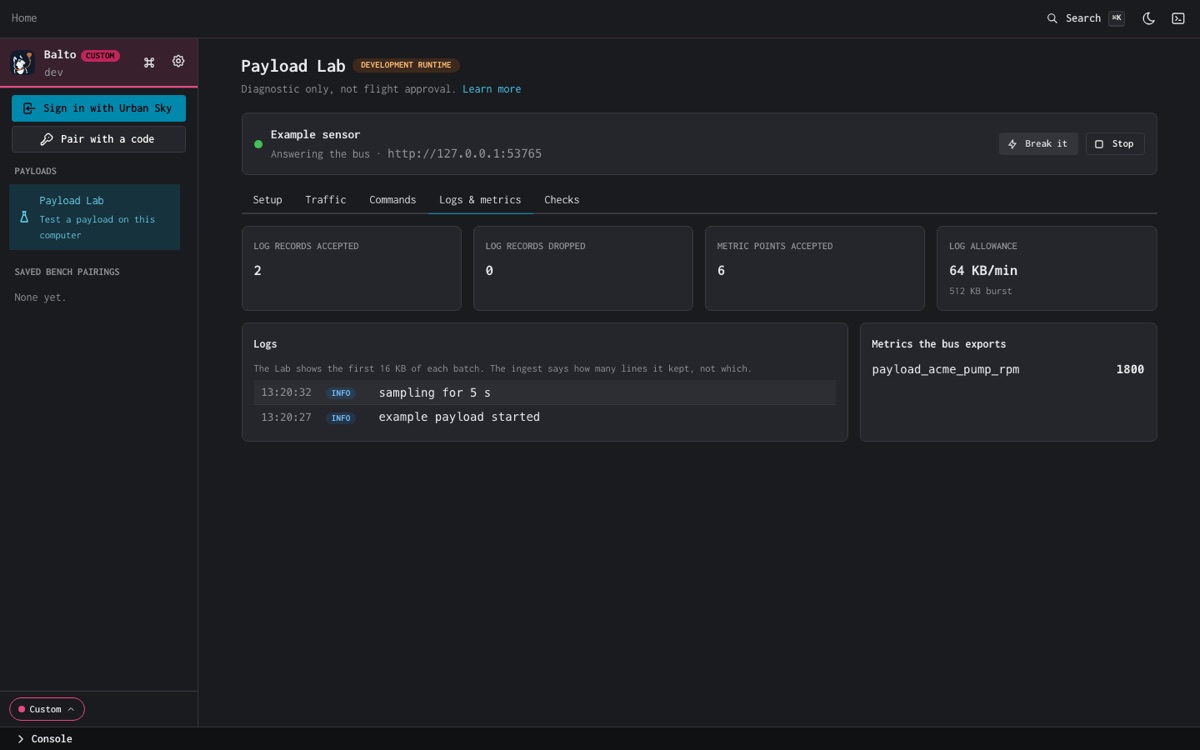
- In Payload Lab, Setup step 5, Logs and metrics reach the bus, is green, and the Logs & metrics tab shows your lines and metric points.
- The check Logs and metrics accepted with no drops passes. See Run the Lab checks.
- Each reply has
"accepted"above 0.PayloadTelemetrykeeps the last one inlast_result(Python) orlastResult(JavaScript). - On a bus,
GET http://<bus address>:4318/api/v1/payload/status, orstatus()in the SDK, shows yourpayload.id,payload.kind, admitted and refused metrics, and drop counts. A bus running uskybus-go 1.3.0-rc9 or later also serves your lines in its bus logs as servicepayload-<kind>. On an older bus, ask Urban Sky support to confirm that your lines arrived, and give them yourpayload.id.
If it fails
| Reply | Meaning |
|---|---|
403 This address is not a payload device on this bus | The bus has no DHCP lease or ARP entry for your address. Use DHCP on the payload LAN. Loopback never works on a bus; in Payload Lab it does. |
413 Request body is over 262144 bytes | Send smaller batches. PayloadTelemetry stays under the limit. |
429 with Retry-After | Over a rate limit. Wait that many seconds. PayloadTelemetry does this. |
"reasons": {"undeclared": n} | Metric names, attribute keys or values that are not declared for your payload. Declare them (see Metrics). |
Connection refused or timeout on port 4318 | Wrong bus address, or the bus's ingest is off. Check BUS_ADDRESS or USKY_BUS_INGEST_URL. |