Appearance
Serve the device API
This is the recommended way to integrate a payload. Your payload serves three HTTP routes on port 8090. The bus finds it on the payload LAN, reads it every second, and announces it to Mission Control (MC) for you. Commands reach your payload from the bus, not from the Internet. The Harrier camera payload works this way.
Your payload needs no device token, no announcement code and no Internet access for this path. If your payload must talk to MC itself, use the self-announce path instead.
Before you start
- Payload Lab open on your computer, with the Example sensor working. You do not need a bus for this step.
- Pick a module name for your device, such as
acme. Use lower-case letters, digits and_, starting with a letter, up to 32 characters.gimbal,rotor,gps,camera,jetson,busandapiare reserved. - Later, on a real bus: ask Urban Sky to allow your module. A bus forwards no commands to a module it has not been told to allow (
PAYLOAD_LAN_MODULES). Telemetry works without it. The Lab opens every module you declare, so you can build commands first.
The complete example is sdk/examples/payload-device-api/server.js, the same device as the Lab's Example sensor. Point the Lab at it while you read this page.
1. Serve the capability document
GET http://<payload>:8090/api/v1/capabilities returns what your device is, what it measures, and what it accepts:
json
{
  "schema_version": "urbansky.payload_api.v1",
  "modules": ["acme"],
  "identity": {
    "display_name": "Acme air sampler",
    "kind": "acme",
    "vendor": "Acme",
    "model": "AS-1",
    "software_version": "1.4.0"
  },
  "telemetry_fields": [
    { "key": "acme.temp_c", "type": "number", "unit": "C", "min": -80, "max": 60 },
    { "key": "acme.state", "type": "string", "enum": ["idle", "sampling"] }
  ],
  "commands": [
    {
      "name": "acme.sample",
      "params": [{ "name": "seconds", "type": "integer", "required": true, "min": 1, "max": 60 }]
    },
    { "name": "acme.reset", "params": [] }
  ]
}Rules the bus applies:
schema_versionis exactlyurbansky.payload_api.v1.- Every command name and telemetry key starts with a module from
modules, then a dot:acme.sample. A name in no listed module is ignored. - Command names are lower case with
_(acme.set_rate, notacme.setRate). - Types are
number,integer,booleanorstring. A string with fixed values usesenum. Give every number aminandmax. requireddefaults to false. A parameter is optional unless you say"required": true.identity.kindlabels your logs and metrics (payload-acme). Use lower-case letters and digits, up to 16 characters.- Optional:
streamsfor video (Video),servicesfor a port support may reach, such as SSH (Test with Balto), andmetrics(Send logs and metrics).
Check it in the Lab: Setup step 3, Its capabilities pass the bus's lint, is green. A refusal names the rule it broke, with a fix.
2. Serve telemetry
GET http://<payload>:8090/api/v1/telemetry returns the current values:
json
{
  "schema_version": "urbansky.payload_api.v1",
  "hostname": "acme-as1-0042",
  "generated_at": 1761400000000,
  "values": { "acme.temp_c": 21.4, "acme.state": "idle" }
}- Return only keys you declared in
telemetry_fields. - Answer fast (under a second). The bus reads this route about once a second and forwards the values to MC.
- Report
hostnamehere. The bus reads it from this route, not from the capability document.
Check it in the Lab: Setup step 4, Every telemetry key gets through, is green. On the Traffic tab each telemetry row reads N forwarded, one for each key you sent. A dropped key shows what you declared and what you sent, for example acme.temp_c: declared number, got string "warm".
3. Accept commands
The bus sends POST http://<payload>:8090/api/v1/command:
json
{ "command": "acme.sample", "parameters": { "seconds": 5 }, "request_id": "3f1c…" }The bus only sends a command your capability document declares, with only the parameters you declared, already type-checked and range-checked. Answer:
| Situation | Status | Body |
|---|---|---|
| Accepted (it will run, or it ran) | 200 | { "success": true, "result": "queued" } |
| Done, with data to return | 200 | { "success": true, "result": { ... } } |
| Refused (bad value, wrong state) | 400 | { "success": false, "error": "why" } |
Same request_id still running | 409 | { "success": false, "error": "in_progress" } |
| Temporarily unable (a service restarting) | 503 | { "success": false, "error": "why" } |
Keep a short memory of recent request_id values. When the same id arrives again, return the first answer and do not run the command twice. MC retries a command when the link drops, so this keeps your hardware from moving twice.
Show the effect of a command in telemetry (for example acme.state goes to sampling). "queued" means accepted, not done.
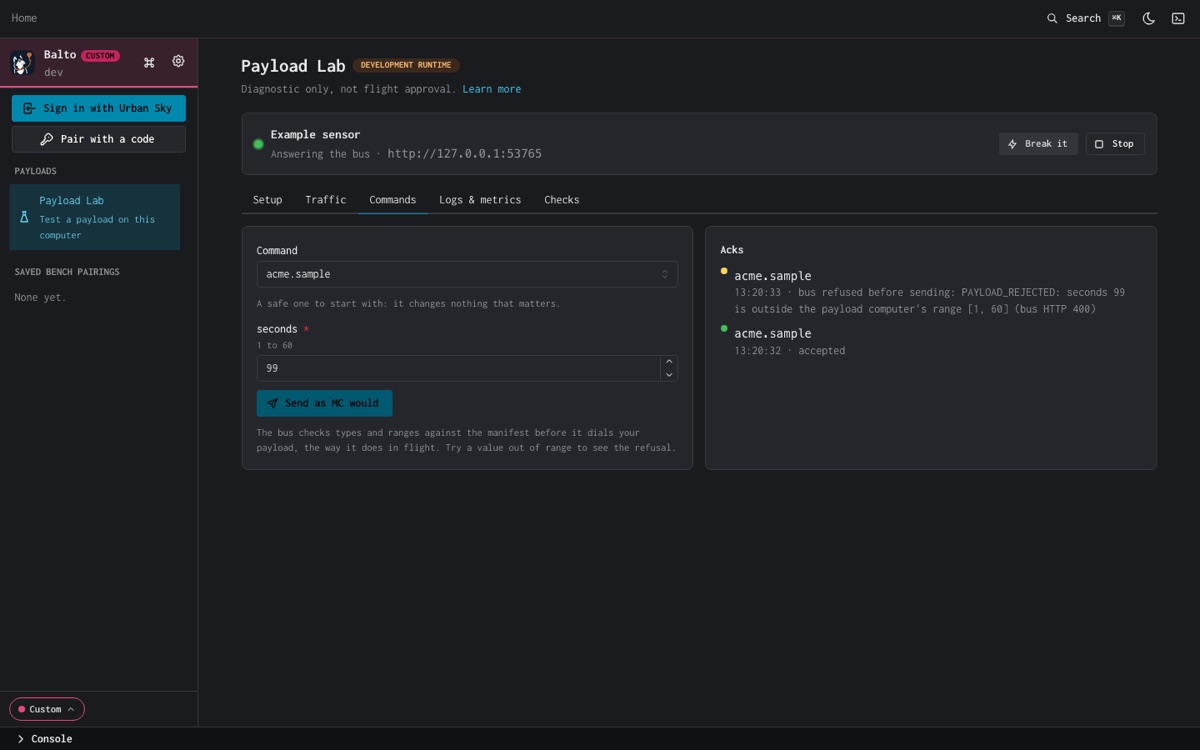
Check it in the Lab: on the Commands tab, pick acme.sample, set seconds, and choose Send as MC would. The ack reads accepted. Try seconds 99: the bus refuses it before it reaches your payload (bus refused before sending), as it does in flight.
Check it worked
In Payload Lab, Setup steps 2, 3, 4 and 6 are green:
- Your payload answers the bus
- Its capabilities pass the bus's lint
- Every telemetry key gets through
- One command comes back acked
Later, on a bus
When you have a test bench and an Urban Sky account, check the same things through Mission Control:
The bus has found your device. In Balto, open your bus and the Payloads tab, or:
bashbalto payloads list --bus <bus>Your device appears as a child of the bus,
<bus>-<key>, with the display name fromidentity.Telemetry arrives every second:
bashbalto trace <bus>-<key> --up --followAdopt it, turn commands on, and send one:
bashbalto payloads adopt <bus>-<key> balto payloads enable-commands <bus>-<key> balto payloads send <bus>-<key> acme.sample seconds=5 balto payloads audit <bus>-<key> --limit 1Then watch
acme.statechange withbalto trace.
If it fails
| Symptom | Check |
|---|---|
| Lab: Nothing listens there. Start your payload, or check the port. | Your payload is not running, or it listens on another port. |
| Lab: It took the connection but never answered. | Your routes hang. Answer each request in under a second. |
| The device never appears | It has a DHCP address on the payload LAN and answers GET :8090/api/v1/capabilities with schema_version exactly urbansky.payload_api.v1. |
| It appears with no commands | The bus does not allow your module yet. Ask Urban Sky to add it to the bus's PAYLOAD_LAN_MODULES. |
| A command is missing | Its name starts with a module you list, it uses lower case and _, and every parameter has a supported type. A command with an untyped param is left out whole. |
The payload computer does not declare 'acme.x' | The bus read your capability document before you added the command. It re-reads it on its own within a minute. |
belongs to no module the payload computer serves | The command's module is not in modules, or it is reserved. |
The acme module's commands are not allowed on this device | Same as "no commands": the module is not in the bus's PAYLOAD_LAN_MODULES. |
... is outside the payload computer's range | The value is outside the min/max you declared. The bus refused it before sending. |
More in Troubleshooting.